Disclosure: Some links on this page are affiliate links, meaning we may receive a commission if you click
If your primary interest lies in acquiring a tablet device for marking up, highlighting, and annotating your e-books and documents—along with occasional personal note-taking—the Amazon Kindle Scribe Colorsoft may justify its significant price tag. For others, however, the cost of this 11-inch, $630+ e-ink tablet, featuring a writable color display, may be challenging to rationalize.
If you are already considering the standard 11-inch Kindle Scribe, priced at $549.99 (which offers a paper-like display, albeit in monochrome), it may be worth investing the additional funds to secure the Colorsoft version, starting at $629.99.
At these price points, both the Scribe and Scribe Colorsoft may be perceived as unnecessary indulgences for most users, particularly when compared to more budget-friendly options like the traditional Kindle ($110) or Kindle Paperwhite ($160).
Image Credits: Kindle
Announced in December, the Fig color variant began shipping on January 28, 2026, and is available for $679.99 with 64GB of storage.
Clearly, Amazon aims to occupy a unique space in the tablet market with these enhanced Kindle devices, positioning them more as competitors to e-ink tablets like reMarkable rather than other Kindle models. However, high-end e-ink readers featuring writing capabilities may not attract a broad audience. Conversely, the versatility of devices like the iPad—capable of streaming video, drawing, writing, utilizing productivity tools, and supporting thousands of native apps and games—makes their cost easier to justify for nearly all consumers.
The Scribe Colorsoft is specifically tailored for a distinct segment of e-book consumers and professionals. Students and researchers may find this device particularly appropriate, as will anyone who routinely needs to annotate files or documents.
Individuals focused on task management or personal journaling might also appreciate this device, but frequent use would be essential to warrant its price tag.
Image Credits: Amazon
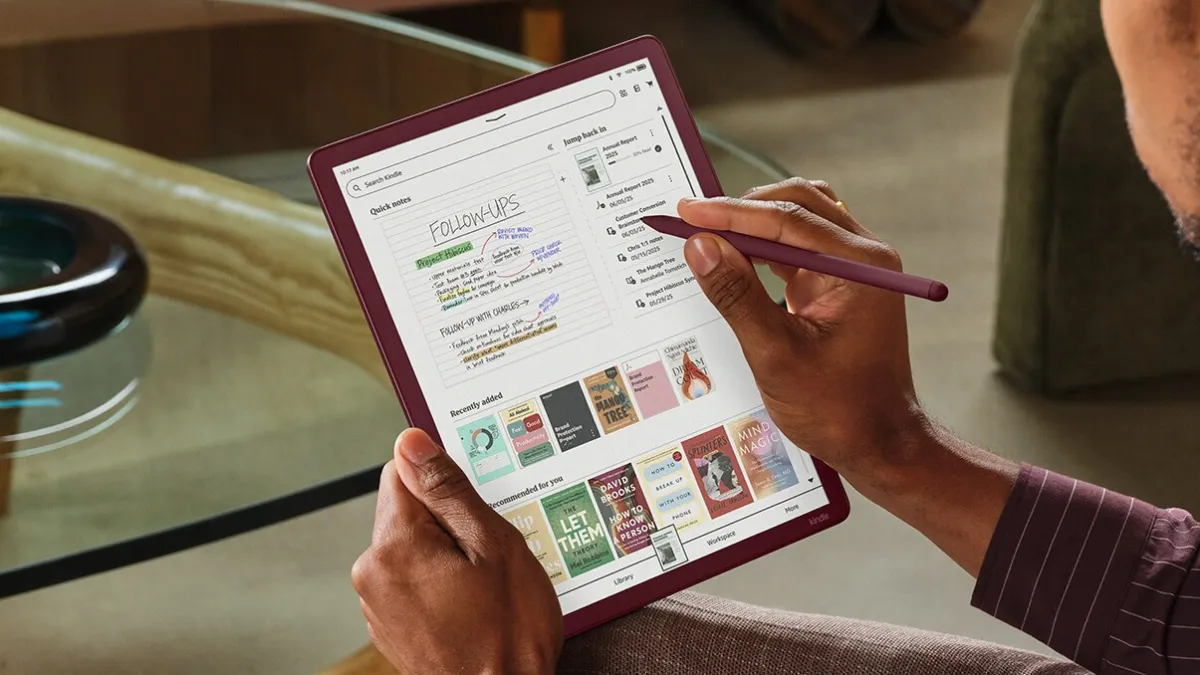
The device is user-friendly, featuring a Home screen design reminiscent of other Kindle models, which facilitates quick access to your notes, library, and even suggestions for books you can annotate, such as Sudoku or crossword puzzle books and drawing guides. Your library titles and book recommendations are displayed in color, enhancing visibility during quick scans.
According to Amazon, this new 2025 model boasts a 40% increase in speed for page turns and writing. Our experience confirmed the tablet’s responsiveness, with quick page transitions and smooth writing flow.
Despite its size, the device remains thin and lightweight, measuring just 5.4mm (0.21 inches) and weighing 400g (0.88 pounds)—making it far more portable compared to an iPad or other tablets (for instance, the iPad Mini, with an 8.3-inch screen, weighs slightly less). You can conveniently carry the Kindle Scribe in a purse or tote, provided the bag can accommodate an 11-inch device. We also appreciate that the bezel of the Scribe Colorsoft matches the original design around the screen.
The Kindle Scribe Colorsoft features a glare-free, oxide-based e-ink display with a textured surface that closely mimics the feel of writing on paper. This aids in the transition for users accustomed to handwriting notes. Additionally, it conserves battery life—boasting up to 8 weeks between charges.
Notably, the display automatically adjusts its brightness based on your current lighting conditions, and users can modify the warmth of the screen for nighttime reading. However, while it is a touchscreen, it doesn’t match the responsiveness of LCD or OLED touchscreens, such as those found on iPads. As a result, actions like pinching to resize text may experience a slight delay.
Image Credits: Amazon
Like any Kindle, the Kindle Scribe Colorsoft allows users to read e-books or PDFs. You can also import Word documents and other files directly from Google Drive and Microsoft OneDrive, or utilize the Send to Kindle functionality. Supported file types include PDF, DOC/DOCX, TXT, RTF, HTM, HTML, PNG, GIF, JPG/JPEG, BMP, and EPUB. Additionally, your Notebooks can be exported to Microsoft OneNote.
The accompanying pen has its own set of advantages and trade-offs. Unlike the Apple Pencil, the Kindle’s Premium Pen requires no charging, which is undeniably a benefit. Designed to emulate the sensation of writing on paper, it glides smoothly across the display. However, its rounded design lacks the flat edge for easy grip, making it less secure in hand.
Amazon’s design necessitates periodic replacement of the pen tips, depending on usage, though this is relatively inexpensive—averaging around $17 for a ten-pack. Nevertheless, managing replacements is an additional consideration.
There are ten different pen colors and five highlight colors available, allowing for vibrant notes and annotations.
Image Credits: TC
When writing, you can select from various tools, including a pen, fountain pen, marker, or pencil with adjustable stroke widths. You can set your preferred pen tool as a shortcut by pressing and holding the side button on the pen (the default setting is highlighting). If you happen to grip the pen too tightly and inadvertently trigger this button, you can easily disable this feature.
The writing experience is, by all accounts, natural. Although the e-ink display yields somewhat muted colors, which may not appeal to everyone, it efficiently serves its intended purposes. While the e-ink tablet may not be ideal for creating digital art, despite its pen and new shading tool, it excels in writing, note-taking, and highlighting.
From the Kindle’s Home screen, users can either jump directly into writing via the Quick Notes feature or adopt a more organized approach by creating a Notebook from the Workspace tab.
Image Credits: Amazon
The Notebook feature offers a diverse selection of notepad templates that allow you to choose between various formats, including blank, narrow, medium, or wide-ruled documents. Additional options include templates for meeting notes, storyboards, habit trackers, monthly planners, music sheets, graph paper, checklists, daily planners, dotted sheets, and more. New templates introduced with this device feature Meeting Notes, Cornell Notes, Legal Pad, and College Rule options.
A convenient eraser function allows you to erase content simply by flipping the pen, similar to using a No. 2 pencil. For more precise deletions, a specialized erasing tool is accessible from the toolbar, offering varying widths. While the e-ink screen may leave a faint trace of your writing or drawing after erasing, this will eventually fade. However, we advise caution for those who may find such remnants bothersome.
A Lasso tool enables you to select, move, copy, paste, or resize elements, although this may see limited use from casual note-takers.
Several other features cater specifically to users who frequently annotate. For example, when writing in a Word document or book, a function called Active Canvas creates space for your notes. As you write directly atop the text in a book, the written content will adjust accordingly. Even if you modify the font size of what you’re reading, your notes remain anchored to the pertinent text. Many users prefer this method for maintaining organization, although opinions may vary.
In documents where margins expand, tapping the expandable margin icon allows you to take notes in the margins rather than directly on the page.
A Kindle with AI
The new Kindle also features several AI tools and functionalities.
Your scribbles can be cleaned up through automatic adjustments, while highlighting and underlining are straightened as well. Occasionally, our review unit froze during highlighting actions, but it quickly recovered upon returning to the Home screen via a side button press.
An innovative AI feature (identified by a sparkle icon at the top left of the screen) allows for text summarization and handwriting refinement. Curiously, this does not include an option for a typed font, but users can select from a limited assortment of handwritten styles (Cadia, Florio, Sunroom, and Notewright) through the Customize button.
Image Credits: TC
The AI tool has its limitations: while it can decipher some poor handwriting, it struggles if other scribbles accompany the text. Nonetheless, it’s a valuable option for individuals who appreciate the tactile sensation of handwriting but may not excel in penmanship.
The AI search function allows you to explore your notebooks for notes or establish connections between them. You can either type your query via the on-screen keyboard or handwrite it, converting your handwritten input into text. Interaction with the search results—enhanced by AI insights—is facilitated through the Ask Notebooks AI feature, enabling queries based on your notes.
Image Credits: TC
Future updates promise to introduce additional AI capabilities, including an “Ask this Book” feature, which allows users to highlight passages and receive spoiler-free answers to questions about character motivations, scene significance, or other plot details. Another feature, “Story So Far,” aims to help you catch up on a book you’ve been reading without revealing any spoilers.
The Kindle Scribe Colorsoft comes in Graphite (Black) with storage options of 32GB or 64GB, priced at $629.99 and $679.99, respectively. The Fig variant is exclusively available at $679.99 with 64GB of storage. Cases for the Scribe Colorsoft are available for an additional $139.99.